Finally, the Pangu team has discovered iOS 9.3.3 – 9.2 jailbreak solution for iDevice users. So, now you can Cydia download your iPhone, iPad & iPod devices running latest iOS versions using new Pangu jailbreak tool.
Here we like to show all necessary information & guides for our users to get Cydia for iOS 9.3.3 – 9.2 devices. Please check your device compatibility in bellow details before enter the jailbreak pathway. You are with supported device, then follow bellow instructions to get your loving Cydia for your device without any matter.
Note: If you haven’t a Windows PC, then follow browser-based method to jailbreak iOS 9.3.3 – 9.2
New Pangu jailbreak only works with 64-bit devices such as;
(Pangu not supports for iPhone 5C, iPhone 5, iPhone 4S, iPad 4, iPad 3, iPad 2, iPad Mini 1st generation & iPod Touch 5 devices)
This guide show you how install Cydia for your iOS 9.3.3 – 9.2 devices using Chinese version of the Pangu jailbreak tool. If you are English user? Then follow Pangu jailbreak English version to install Cydia for your iPhone, iPad or iPod.
How to install Cydia for iOS 9.3.3 with Pangu jailbreak English version?
Step 01.
Download & install pphelper tool for Windows
Step 02.
Connect your device to Computer using USB cable
Step 03.
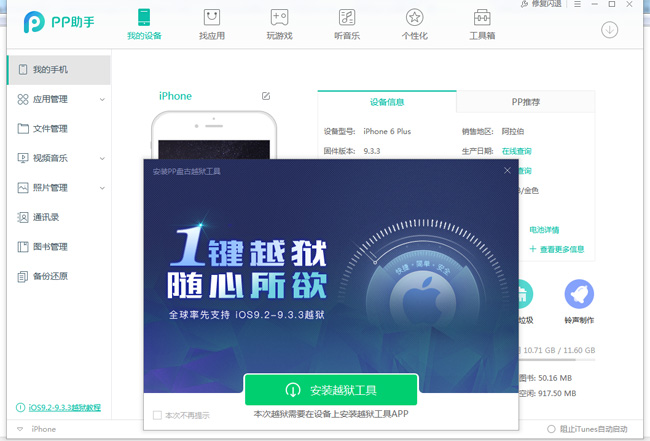
Click on the only button on the window
Step 04.
You will see a new PP app on your desktop. Double click & open it
Step 05.
Click on the green button & wait few minutes
Step 06.
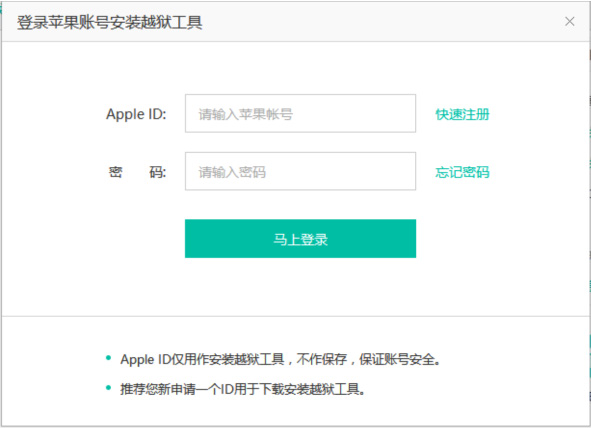
Enter a valid Apple ID & password, then click on green button (Recommend create & use a new Apple ID instead of your regular Apple ID)
Step 07.
Wait a few minutes & check your home screen. You will see Pangu/PP app on your iOS device’s home screen. Before open the app you should verify it as follows..
Step 08.
Go to Settings ->General->Profile Management and select the profile that available with your Apple ID & trust
Step 09.
Now open the Pangu/PP app on your iOS device’s home screen.
Step 10.
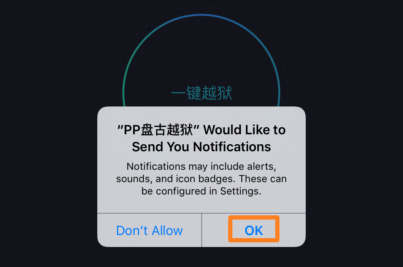
Click on OK button & tap on the circle in the middle of the app.
Step 11.
Lock your device manually by pressing sleep button once. Then, notifications will appear that says your device has been jailbroken!
Step 12.
Unlock your device and launch Panngu/PP app again. After few moments your device will reboot with Cydia on the Home screen. Congratulations.! You have successfully jailbroken & install Cydia on iOS 9.3.3. Tap on Cydia icon to initial launch & prepare the filesystem.
Unable to jailbreak your device with Pangu ? Just follow bellow guide to fix common issues & jailbreak successful..
Note :
Can download latest Cydia for your device ?Cydia is a most powerful app store developed…
Your favorite Cydia application has hundreds of apps for users. Can download Cydia for any…
What is Panda Helper App This is one of the best Cydia alternative application developed…
One of the best Cydia alternative Panda Helper not only support for iOS but also…
You can watch movies and TV shows in HD quality with this new app Aston…
Cydia is your favorite application which can use to download third party applications. Actually jailbreak…



View Comments
man i just followed all the steps and it ended with the download of a chinese dictionary, im a lil disapointed
Wait until English version out for public
FINALLY!!! I finally got past 9.3.2 and 3!!! Just like the gentlemen said above. JUST FOLLOW INSTRUCTIONS
please i have iphone4s ios 9.3.2 can,t jailbreak what is the problem i try with all ways
Pangu this version only support for 64 bit devices. Please follow our guides properly to install Cydia.
I get an error when I re jail broke my phone by hard resetting it. I successfully jailbreak it and then I go onto Cydia and it comes up with these two errors: Could not open file /var/lib/dpkg/status - open (2: no such file for directory)
The package lists could not be parsed or opened.
Please help
I have iPhone 4s iOS 9.3.2 too
Unable to install Cydia application now. Pangu verified their tool not support for iPhone 4S.
Yeah i also
I love my brother
I have a question here....
Im thinking to go for jailbreak my 6 plus 9.3.3
As it is said to use your burner Apple ID (not your real apple ID)
so before proceeding with the steps do i have to remove my existing apple id which is currently configured in my Iphone...?
Or i have to use the newly created Burner Apple ID only when it asks for Apple ID and password so that jailbreak PP can be installed on Iphone with valid certificate.....
You do not remove you current Apple ID for use burner ID. If you are confuse with this process, you can follow updated method that no need a computer or Apple ID to jailbreak with Pangu
Follow.. http://cydiainstaller.net/ios-9-3-3-jailbreak/install-jailbreak-computer/
I have iPhone 5s,How can I install cydia I don't computer?
Follow these instructions to install Cydia
1.Backup your device
2. Follow these instructions to install Cydia without computer
http://cydiainstaller.net/ios-9-3-3-jailbreak/without-computer/
hi sir i have iphone 5 9.3.2 . am i able to install cydia?
iPhone 5 unable to install Cydia app, Please touch with us
the loading screen (from pp app)install the jailbreak but after 1 hour, the loading screen is at the same step (first) what should I do ?
Please use Pangu 1.1 latest version [English] & jailbreak again.
http://cydiainstaller.net/cydia-ios-9-3-3/pangu-jailbreak-1-1-update/