Categories: Cydia Eraser

Cydia Eraser Gets Update For iOS 10 Jailbreak – How To Download & Use ?

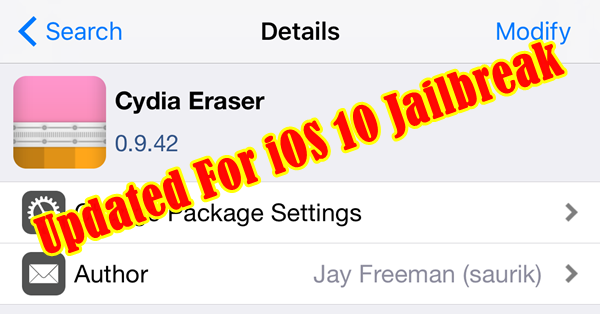
Here’s the very important news for jailbreakers. Finally, Saurik has updated his magical tool, Cydia Eraser to support iOS 10. With this release, iOS 10 jailbreak users can completely remove Cydia & unjailbreak the device with fully restore to current stock iOS without updating to highest version.

Are you not familiar with this tool? What is Cydia Eraser ? It is a very important jailbreak utility developed by the Saurik (Cydia developer) for jailbreakers for free. Using the Cydia Eraser, you can completely remove jailbreak from your device & restore to original state but without updating your current firmware. This process entirely remove Cydia, Cydia apps with  all data on your device & revert all changes made by the jailbreak process, then return your jailbroken device to unjailbroken stock state. This process keeps your device jailbreak ability so, you can rejailbrek your device at any time.

Before this, Cydia Eraser has already supported for iOS 7.1 to iOS 9.3.3 running iPhone, iPad & iPod (jailbroken) devices. With this update, now it can be used with iOS 10 jailbreak users as well. Also, it is compatible with all iOS 10 jailbreak tools such as match_portal, yalu102 & extra_recipe. When the firmware support is concerned, Cydia Eraser is compatible with iOS 10.0.1, 10.0.2, 10.0.3, 10.1, 10.1.1 (14B100) & 10.2

When you should use Cydia Eraser ?

In below cases, there is no any better solutions unless Cydia Eraser.

  • If you get serious issue with Cydia, jailbreak teak on your device and you’ve already tried ordinary troubleshooting steps but not fix, then you have to start over again with a fresh install.
  • When your device is running slow, then you want to wipe it clean & restore to the stock state. If you use iTunes, you can do that, however you will lose jailbreak ability of your device. But, using Cydia Eraser you will be safe to rejailbreak.
  • When you going to sell your device to someone else, you want to remove all of your data, accounts & setup from the device. Therefore you have to restore your device. But, you don’t want to upgrade iOS & remain jailbreak ability of the device. Because, it increases resale value of your iOS device
Please note :
  • Cydia Eraser not supports to upgrade or downgrade your current iOS version.
  • This tool will erase all the data on your device
  • You should need to re-activate the device after using Cydia Eraser. Therefore, it’ll be required your Apple ID & Password to get access your device, if you had enabled “Find My iPhone” for your device.
  • The device should be connected to the internet during running this tool.
  • It is better your device has fully charged before the proceed.
Important : Before use Cydia Eraser
  • You should complete back-up your device using iTunes
  • The device should be connected to the internet
  • Charge your device – the device should not be low on battery
While using Cydia Eraser ;
  • Please make your device’s internet connection alive
  • Avoid do anything while Eraser is running
  • The process takes 5 to 20 minutes of time to finish. Please wait & see patiently until reboot your device after completing the process.

Important : Cydia Eraser for iOS 10 still in beta stage. So, sometimes it could not be worked in order. Please use with your own risk. Strictly advice to take a fully backup your device before use this.

How to install & use Cydia Erase ?

  1. Launch Cydia & select “Sources” tab
  2. Tap on “Edit” > “Add”
  3. Enter the URL – http://apt.saurik.com/beta/eraser-10.1/ in the popup window appears & tap “Done
  4. Select “Search” tab in Cydia, find & install “Cydia Eraser
  5. Launch Cydia Eraser app on your Home Screen & carefully read all the instructions are given
  6. Tap on “erase all data, unjailbreak device
  7. Tap on “Erase All” to confirm
  8. It will take 5 to 20 minutes to proceed. During the process, your device will reboot several times. Once completed, welcome screen will appear. Now you have a fresh device with same iOS version running before restore. Activate the device using your Apple ID & Passward. Congratulations..! Now you are able to re-jailbreak & install Cydia for your device any time.
admin

View Comments

Recent Posts

How to install MovieBox Pro 2024 without Cydia for Any iPhone,iPad,iPod Touch

Can download latest Cydia for your device ?Cydia is a most powerful app store developed…

3 years ago

Download 3UTools VIP free for Your Device – Best Cydia alternative

Your favorite Cydia application has hundreds of apps for users. Can download Cydia for any…

4 years ago

Most famous Panda Helper apps 2022 – Cydia Alternative

What is Panda Helper App This is one of the best Cydia alternative application developed…

5 years ago

Cydia alternative Panda Helper for Android Running Devices

One of the best Cydia alternative Panda Helper not only support for iOS but also…

5 years ago

Astoncine APK download & install for Android devices

You can watch movies and TV shows in HD quality with this new app Aston…

5 years ago

How to install MovieBox/MovieBox Pro without Cydia for iOS 15 -3UTools

Cydia is your favorite application which can use to download third party applications. Actually jailbreak…
5 years ago