Pangu jailbreak for iOS 9 is now available in Mac version. This is the complete tutorial for how to jailbreak iOS 9 – 9.0.2 using Pangu on Mac. Users with compatible dvices running iOS 9.0 – iOS 9.0.2 are welcome to jailbreak & install Cydia for their devices with five steps. just follow the instructions are given below to success..
Note : This guide is only for the Mac users. For Windows users guide, follow below link..
Download Pangu MAC latest version – Download Now
Pangu 9 Mac version can be applied for following iOS devices to jailbreak & Cydia download
Step 01 >> Download latest version of Pangu 9 jailbreak tool for Mac on your computer from below links.
Version 1.0.0 Download Now
Step 02 >> Double-click on the downloaded Pangu jailbreak dmg file to mount. Then, drag and drop it to the Applications folder. Double-click again on the Pangu9 icon to launch it. (If you fail with an error saying “Pangu9 can’t be opened because it is from an unidentified developer”, then right click on the Pangu9 icon, and select “Open” in the menu)
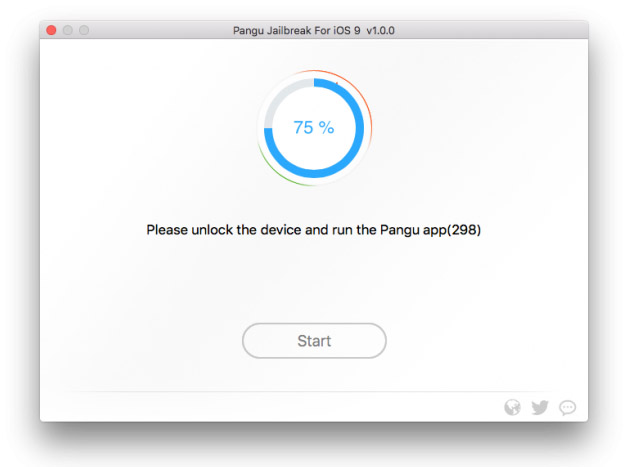
Step 03 >> Connect your iOS device to computer with USB cable & wait to detect your device by the program. Then, Click on “Start” button
Step 04 >> Select “Already Backup” button to continue jailbreak process.
Step 05 >> At around 65%, program will ask you to unlock your device and enable “Airplane Mode” again. Then, do it.
Step 08 >> Wait patiently & keep your device connected. Once the process is completed, your device will reboot again and tell you that device is “Already Jailbroken”
Step 09 >> Congratulations.! you have successfully jailbroken your device. Now you can see the Cydia icon on your home screen
This means, you have successfully installed Cydia on your idevice. Now you are able to endless customizing your device with amazing Cydia tweaks & apps.
After install Cydia on your device? Check-out here for;
Something wrong with the Pangu iOS 9 jailbreak process? Here’s troubleshooting..
Can download latest Cydia for your device ?Cydia is a most powerful app store developed…
Your favorite Cydia application has hundreds of apps for users. Can download Cydia for any…
What is Panda Helper App This is one of the best Cydia alternative application developed…
One of the best Cydia alternative Panda Helper not only support for iOS but also…
You can watch movies and TV shows in HD quality with this new app Aston…
Cydia is your favorite application which can use to download third party applications. Actually jailbreak…
View Comments
My name is Mohammed
I like Cydia
How do I start where I see the iOS please help me
General -> About -> Version
Hi can you ask Apple to let us use pangu
Apple will not allow for jailbreak iPhone, iPad or iPod.
where the download button
We have added direct download link for latest version
cydia instal
Follow our guides & install Cydia clearly.
How can i install , i did not succed and im trying since 1h
Can someone help me ?
Please jailbreak with Pangu latest version.
http://cydiainstaller.net/ios-9-1-jailbreak/jailbreak-download-pangu/
Hi I want download the cydia esay way
Jailbreak is one and only easy way to install Cydia. Please follow real jailbreak tools to get Cydia with protecting your device.
Is there another way to get cydia without using pangu and with iOS 9?
This moment you are unable to get Cydia. Pangu is one and only way to install Cydia app for iOS 9.0- 9.1.0
Pangu is the only tool that can be used to get Cydia for iOS 9 devices.