Categories: iOS 8 Jailbreak

Install Cydia for iOS 8 – 8.1with latest Pangu 1.2.1 jailbreak [step guide]

Now Cydia available for the latest firmware versions. Upgrade your iPhone, iPad or iPod to iOS 8.3 & install Cydia using new TaiG jailbreak 2.1.2 right now.!

Tutorial – How to instal Cydia for iOS 8.3 with TaiG jailbreak?

#Updated to Mac

Finally After the hard work, Saurik  and Pangu team got Cydia on iOS 8. Now Cydia is completely compatible & stable on iOS 8 iDevices. Pangu bundle with latest Cydia for iOS 8 now. It will be optimized the jailbreak process with this latest Pangu version. In first time, Restore function is interrogated with Pangu jailbreak for you.

Below the steps for latest Cydia install with Pangu jailbreak for iOS 8 – 8.1 devices.

What should you do before jailbreak with Pangu
  • Please make sure your device compatible with Pangu8 jailbreak (iPhone 4S, 5, 5C, 5S, 6, 6 Plus  |   iPad 2, 3G, 4G, Air, Air 2  |  iPad Mini, 2, 3  |  iPod Touch 5G
  • Also consider about the running firmware version. It should be iOS 8, iOS 8.0.2, iOS 8.1 (It is better, your device Restore to iOS 8.1 using iTunes or Pangu8 app, before jailbreak. Mac users must have to restore the devic to iOS 8.1 before jailbreak)
  • backup the device full with iTunes
  • Switch your device to airplane mode
  • Turn off Passcode and security locks
  • Disable “Find my iPhone” feature.
Importante
  • Do not delete this file  “com.apple.mobile.softwareupdated.plist” or disable the service. – will cause unable to boot
  • The warning of “Disk is almost full” – Don’t panic. It will not affect your device. After the Cydia installed it may disappear.
  • Usually, it will be unable to jailbreak, idevices which are upgraded through OTA. Then try after restore your device, Pangu also provided one-touch restore function for you.
How to install Cydia with jailbreak
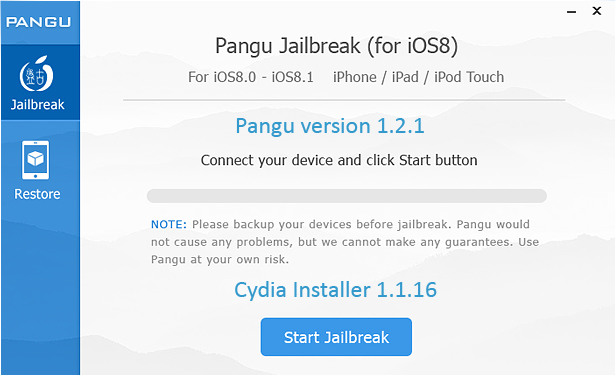
  1. Download Pangu jailbreak tool on your computer. For WindowsPangu8 1.2.1 / For Mac Pangu8 1.0.0
  2. Execute the program (Windows user Run as an administrator).
  3. Connect your idevice to the Computer via the USB cable and click “Start Jailbreak” button.
  4. Then it will show “Notice of  Pangu 8” window and click “Already Did” to continue the jailbreak process.
  5. The Process of jailbreak takes few minuets for complete and end, your iDevice will automatically reboot.
  6. All complete, Now Cydia is in your home screen. Tap on it to the initiate.
  7. Enjoy with Cydia, its amazing & you’ll wonder.

You may also like;

How to install Cydia for iOS 8-8.1 devices using latest TaiG jailbreak?

TaiG jailbreak for iOS 8.1.1 – Cydia download & install

admin

View Comments

Recent Posts

How to install MovieBox Pro 2024 without Cydia for Any iPhone,iPad,iPod Touch

Can download latest Cydia for your device ?Cydia is a most powerful app store developed…

3 years ago

Download 3UTools VIP free for Your Device – Best Cydia alternative

Your favorite Cydia application has hundreds of apps for users. Can download Cydia for any…

4 years ago

Most famous Panda Helper apps 2022 – Cydia Alternative

What is Panda Helper App This is one of the best Cydia alternative application developed…

5 years ago

Cydia alternative Panda Helper for Android Running Devices

One of the best Cydia alternative Panda Helper not only support for iOS but also…

5 years ago

Astoncine APK download & install for Android devices

You can watch movies and TV shows in HD quality with this new app Aston…

5 years ago

How to install MovieBox/MovieBox Pro without Cydia for iOS 15 -3UTools

Cydia is your favorite application which can use to download third party applications. Actually jailbreak…
5 years ago